Every to-do list app promises the same thing: capture everything, feel in control. And for a while, each one delivers. You add tasks, you check boxes, you feel organized. Then a normal week hits — back-to-back meetings, a few fires, a list that keeps growing — and the app quietly stops helping. The tasks are all still there. You just can’t tell which ones today can actually hold.
The problem usually isn’t the app. It’s that most to-do list apps were built to store tasks, not to plan a real day. A list can hold a hundred things without ever telling you that you have ninety free minutes. That gap — between an infinite list and a finite day — is where task management quietly breaks down.
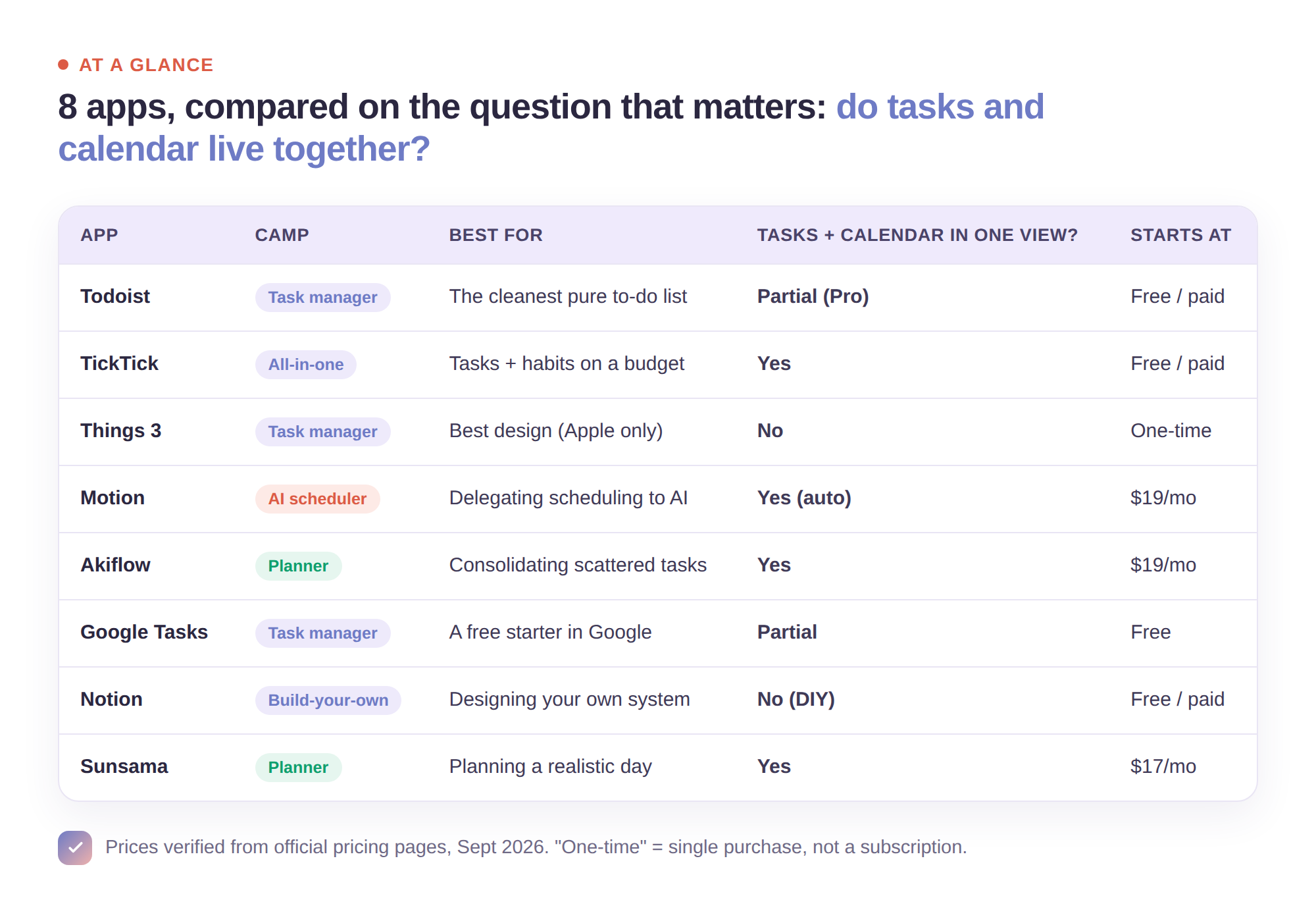
So this isn’t a ranking of which app has the most features. It’s a look at eight of the best task and planning tools in 2026, judged on one question that actually predicts whether you’ll still use it in a month: how well does it connect what you need to do with the time you actually have? Some are pure task managers. Some are calendars with tasks bolted on. A few try to hold both at once. Here’s where each one fits.
How to think about the choice
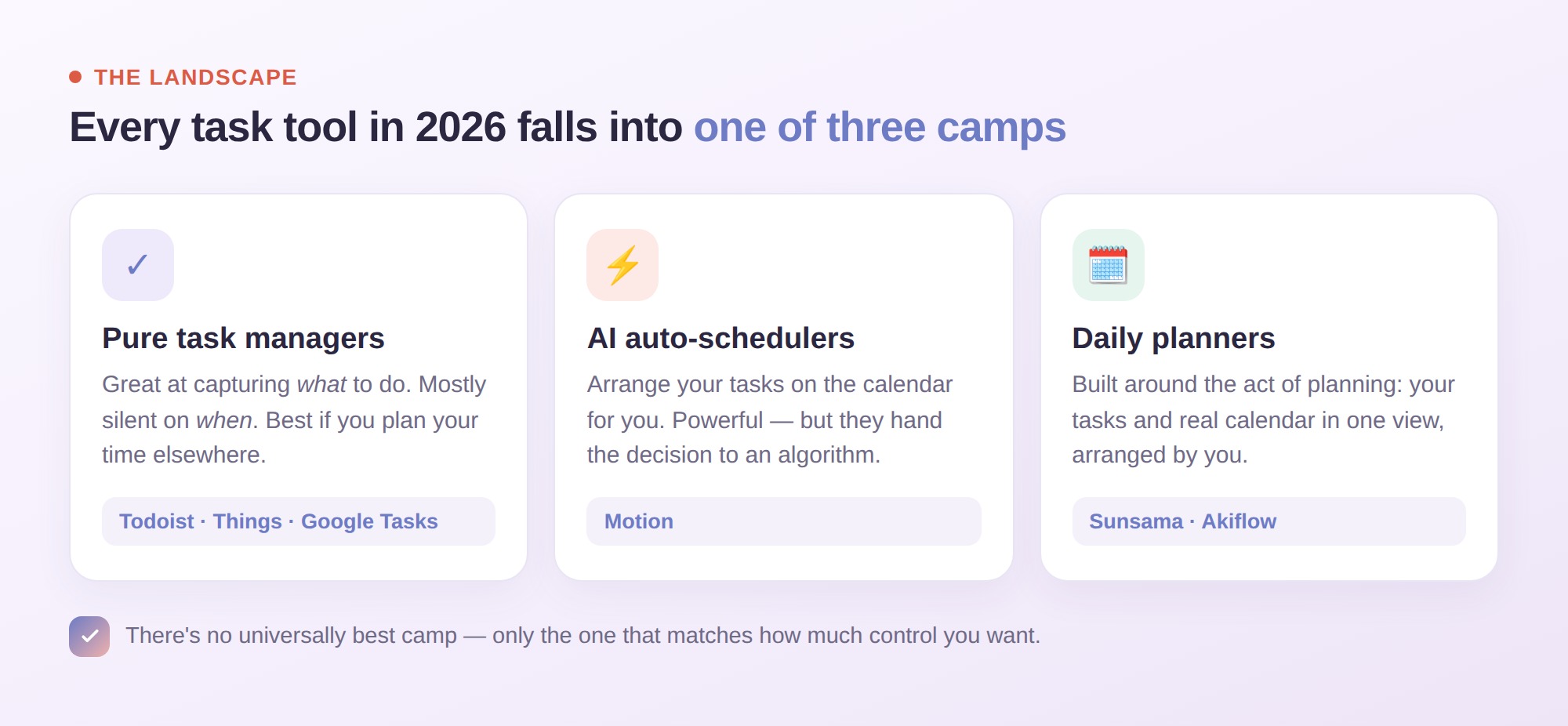
Before the list, one distinction that makes the whole category easier to navigate. Task tools in 2026 fall into three camps.
Pure task managers are beautiful, fast places to capture and organize tasks. They’re excellent at what you need to do and mostly silent on when. Best if you already plan your time elsewhere.
AI auto-schedulers take your task list and automatically arrange it on your calendar for you. Powerful when they work, but they hand the planning decision to an algorithm — which some people love and some quietly resent.
Daily planners are built around the act of planning: you sit down, look at your real calendar, and decide what today is for. Tasks and time in one view, arranged by you.
There’s no universally “best” camp — only the one that matches how much control you want. Keep that in mind as you read.
The 8 best to-do list and planner apps in 2026
1. Todoist — the best pure to-do list
Todoist is the reference point for a reason: fast capture, natural-language input (“email Sam Friday 3pm” just works), and a clean system of projects, labels, and filters. The free plan covers the basics but caps you at five active projects, which is where committed users hit the upgrade. What Todoist deliberately isn’t is a planner — it holds your tasks impeccably but doesn’t show them against your day. Best for people who want the cleanest possible list and plan their time somewhere else.
2. TickTick — the best all-in-one for the price
TickTick does a lot in one app: tasks, a built-in calendar view, a habit tracker, and a Pomodoro timer. It’s the Swiss Army knife of the category, and its paid tier is one of the most affordable around. The trade-off is that doing many things means none of them go as deep as a specialist tool. Best for people who want tasks, habits, and a calendar in one place without paying premium prices.
3. Things 3 — the best-designed (if you’re all-Apple)
Things is the app people show off. The interaction design is genuinely beautiful, and its “Today” and “Upcoming” views make a task list feel calm instead of crushing. Two catches: it’s Apple-only, and it’s a task manager, not a time-planner — there’s no live calendar layer or team collaboration. It’s also a one-time purchase per platform rather than a subscription, which some people love. Best for solo Apple users who value craft.
4. Motion — the best AI auto-scheduler
Motion’s pitch is that you shouldn’t plan at all — you add tasks with deadlines and durations, and its AI arranges them on your calendar, rescheduling automatically when your day changes. At $19/seat per month (billed annually; more monthly), it’s betting that automation beats deliberation. When it fits, it feels like magic. The catch is philosophical: it decides your day for you, and if you’re the kind of person who wants to make that call, the automation can feel like a loss of control rather than a gain of time. Best for people who’d rather delegate scheduling than do it.
5. Akiflow — the best task consolidator
Akiflow pulls tasks from all your tools into one command-bar-driven inbox, then lets you time-block them onto your calendar by hand. It’s fast and keyboard-first, aimed at power users who live in shortcuts. At $34/month (or $19/month billed annually), it’s a premium tool for people whose main pain is scattered tasks across many apps. Best for the heavily-integrated professional drowning in sources.
6. Google Tasks — the best free starter
If you live in Gmail and Google Calendar, Google Tasks is already there, free, and does the obvious thing: simple lists that show up beside your calendar. It’s deliberately minimal — no natural-language input, no advanced organization, no real planning workflow. But for someone who just wants a basic list next to their meetings at zero cost, it’s a fine place to start (and to eventually outgrow).
7. Notion — the best if you want to build your own system
Notion isn’t a task app; it’s a construction kit you can build a task system inside. The ceiling is high — databases, custom views, whatever structure your brain wants. The floor is the catch: you have to build and maintain it, and a system you tinker with is a system you can procrastinate inside. Best for people who genuinely enjoy designing their own way of organizing tasks and will actually keep it up.
8. Sunsama — the best for planning a realistic day
Full disclosure: this is our blog, so weigh the last entry accordingly. Sunsama sits in the “daily planner” camp on purpose. Instead of storing an infinite list or auto-scheduling for you, it walks you through a short daily planning ritual: pull in tasks from your other tools, look at your actual calendar beside them, and drag each task into a real time slot — so the plan you make is one your day can survive. It also asks you to estimate how long things take and warns you when you’ve planned more than your day holds. It’s a subscription ($22/month, or $17/month billed annually) with a 14-day free trial, and it’s aimed squarely at people whose problem isn’t capturing tasks — it’s fitting them into a day that’s already half-committed.
Try it in Sunsama: Connect your task tools and calendar, then drag tasks onto open time to build a plan against the day you actually have.
The honest way to choose
Skip the feature-count comparison. Ask two questions instead.
First: is your problem capturing tasks, or fitting them into your day? If tasks slip through the cracks, a great pure task manager like Todoist or Things fixes that. If your list is fine but your days still overflow, no amount of better capturing will help — you need a planner that shows tasks against time.
Second: how much control do you want over your schedule? If you’d happily hand scheduling to an algorithm, an auto-scheduler like Motion is the shortcut. If you want to decide what your day is for — and feel the difference that deciding makes — a daily planner keeps that decision yours.
Pro Tip: Whatever you pick, give it two full weeks before judging it. Every one of these tools feels great on day one; the real test is whether it survives a genuinely bad week. If an app makes a chaotic Thursday easier to replan, keep it. If it just becomes another place your overwhelm lives, move on without guilt.
Where most people land
Most people don’t need more places to store tasks — they already have three. What’s usually missing is the one view where tasks and calendar sit together, so the daily plan is honest about time. That’s the real dividing line in this list: the tools that keep what and when apart, and the few that put them in one place.
If you already plan your time well and just want a beautiful list, pick from the pure task managers and move on. If your days keep falling apart despite a tidy list, the fix isn’t a better list — it’s planning against your real calendar, ideally by dragging each task onto a real time slot. That’s a different tool, and often a different habit worth building.
Still torn between going digital and staying on paper? That’s its own decision worth making deliberately. But wherever you land, the best app is the boring one: the one you’ll still open on your worst day. Choose for that day, not the easy one.