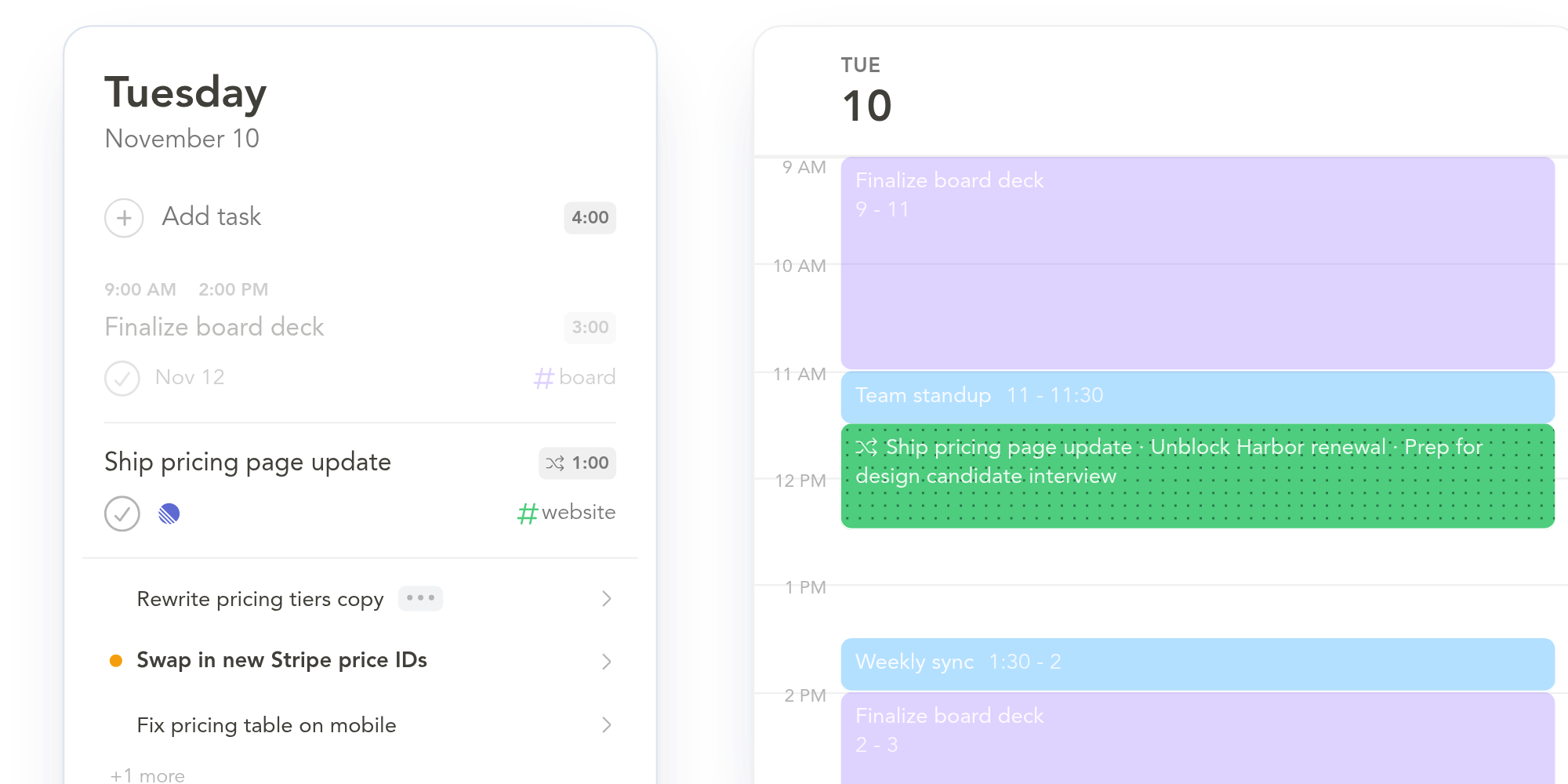
It’s been a weird year figuring out how Sunsama fits into this new world. In the span of one year, the day to day experience of being a “knowledge worker” is unrecognizable from what it was at the start of the year. Last November, I could feel things changing. I’d dabble in AI to help me complete part of a task but the flow and structure of my day largely was the same. Now my entire day is dictated and driven by my AI usage. It’s nice that I’m producing, in one day, the amount of work I did in a week before but it’s not without its costs.
I used to lose myself inside the work I was doing. Now I lose myself amongst all the work I am doing.
With the entire shape and feel of our days changing, my colleagues and I have been figuring out how Sunsama changes to meet this new reality. We’ve always built Sunsama with a focus on “how it feels” to go through a workday because feeling good is the secret sauce to the productivity dragons most people are chasing (doing more and doing it faster). The place to start, before we talk about what we’ve been building, is what it’s felt like to go through a workday where AI is a fact of life. Here’s some of what I’ve felt:
- I struggle to step away from work because AI makes it so much harder to get stuck. I used to just give up for the day when I got stuck knowing a fresh mind would solve it tomorrow or just go for a walk.
- I don’t know how to feel about my progress each day. What is a good day’s work now? It’s hard to recalibrate.
- I forget what I was supposed to be doing more than ever before. I used to lose myself inside the work I was doing. Now I lose myself amongst all the work I am doing.
- I find rabbit holes more seductive than ever. I routinely get “nerd sniped” by a colleague or customer’s comment and start something new. It’s too easy to start things but finishing still requires the same attention to detail as before so I feel like I spend all of my days on that very hard last-mile of polishing things.
It’s not an exhaustive list by any means but the net effect is I can do a lot more but I do not feel as good doing it and I want to feel good as I move through my day.
A guiding principle for Sunsama, before all the AI stuff, was that the right tools can protect and augment our mind, psychology, and habits against the negative externalities of powerful technology. Before AI, that corrosive, always-on technology was your Jira backlog, never-ending Slack pings and emails on your iPhone. How chill and low-tech it all seems now! So our mission at Sunsama stays the same, even if what we’re fighting against leveled up.
So let me share what we’re cooking up to help you stay ambitious and productive at work while staying sane and feeling good.
A new daily planning ritual
Sunsama now builds out your daily plan based on a short prompt from you. You tell Sunsama what really matters to you today and then Sunsama researches your calendar, your connected tools, work in progress and objectives and builds out a plan that matches your intent. After months of beta testing, we’re confident the new planning ritual strikes the right balance of taking grunt work off your hands while keeping the decision making and intentionality in your hands.
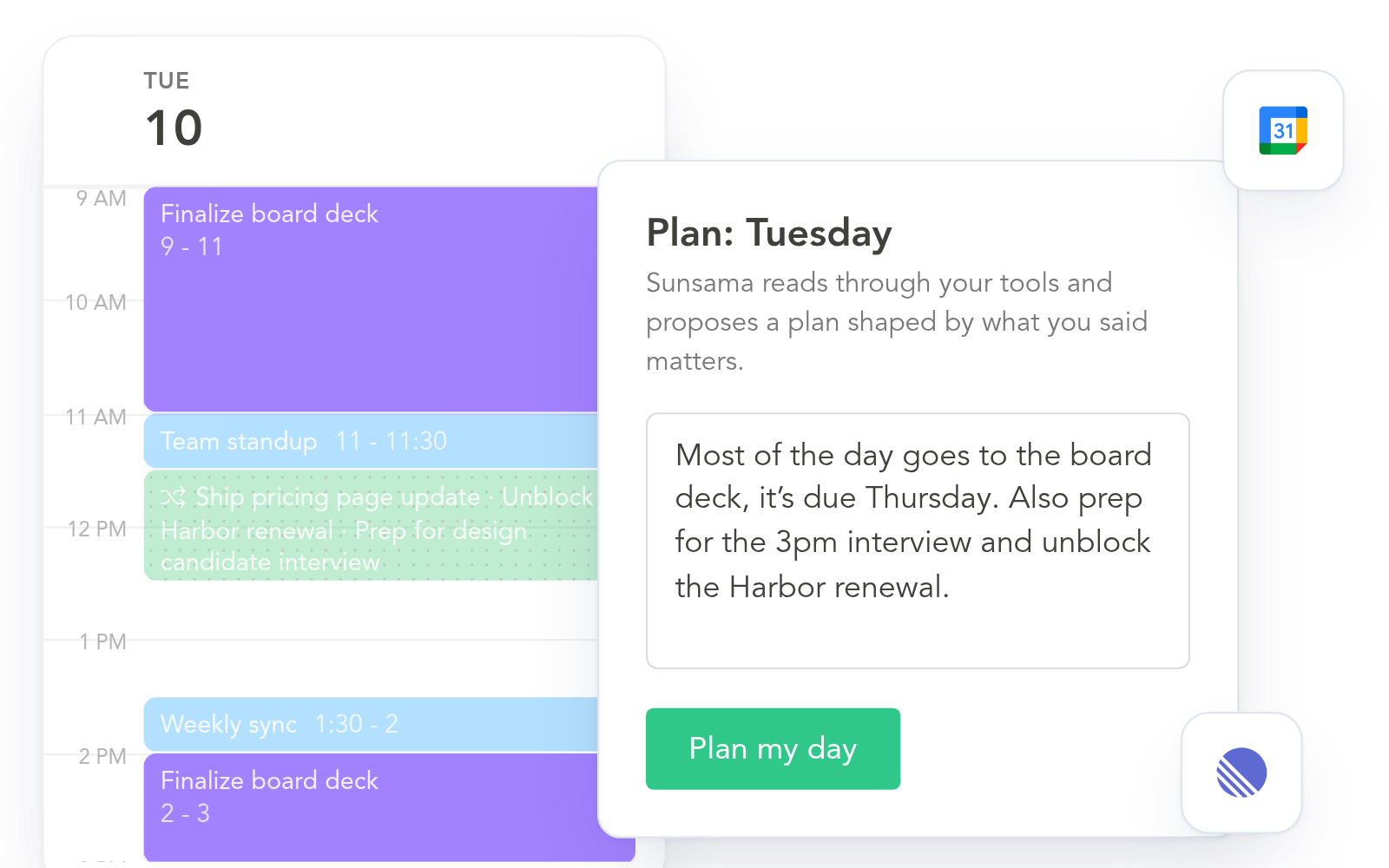
It’s easier than ever to just jump into your work and lose yourself so it was critical for us to build an experience that gets you a high quality plan for the day with minimal effort from you.
This new planning ritual is already live for all new users and will soon become the default experience in the app. For those who love the old version, it’s still possible to take all the actions in the app, you just won’t see the step by step guide anymore.
Parallel Time
Sunsama now supports the idea of working on tasks in parallel. When you set the time estimate of a task, you can also set whether it will be worked on in parallel with other tasks. If you then toggle on your task projections, you’ll see parallel tasks cluster together and occupy one block of time.
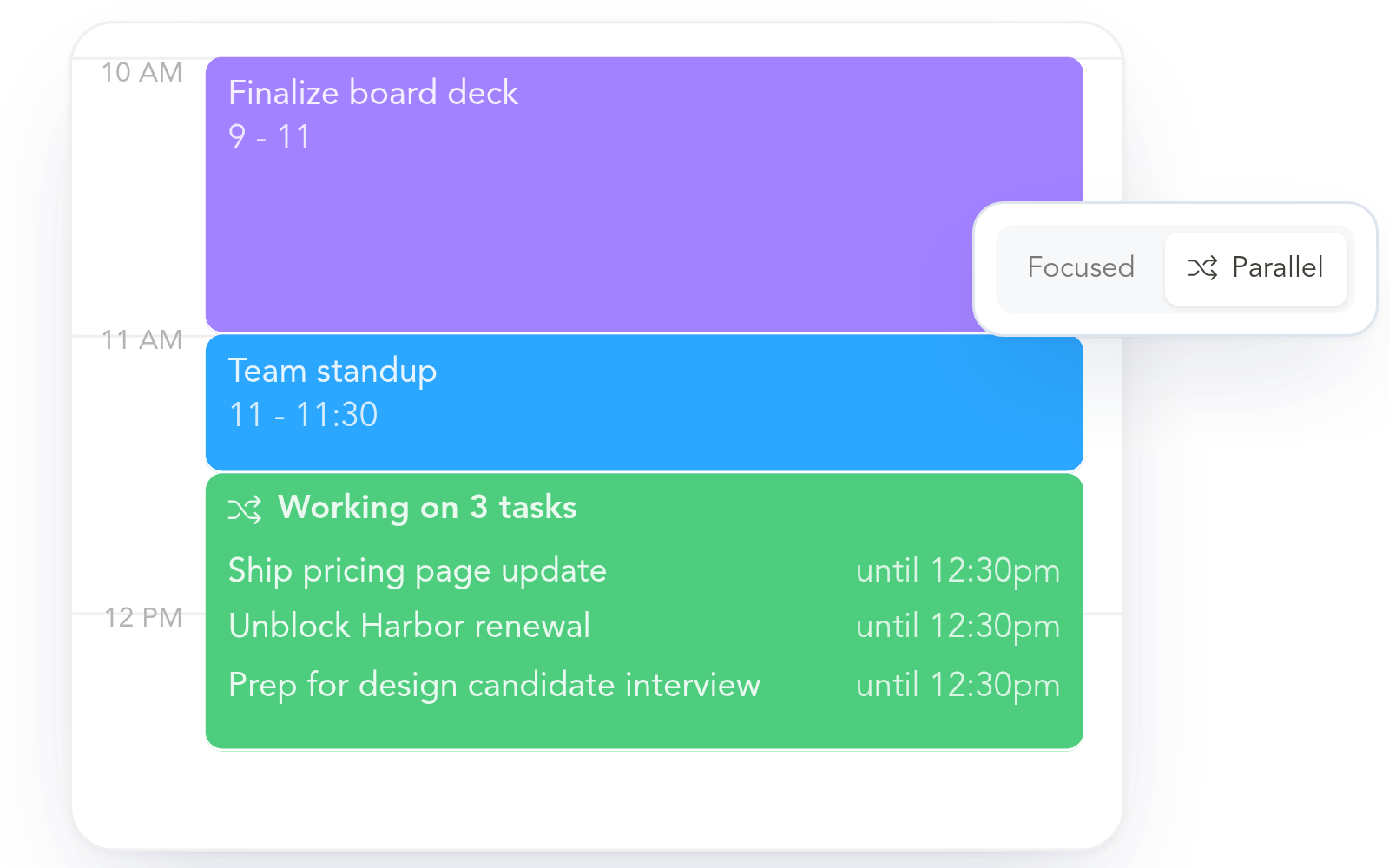
Embracing parallelism felt dirty to me. I was a big “Deep work” guy. I truly believed in it and practiced it for years but it feels unrealistic to me now. I’d rather do something valuable than browse the internet between my agent’s turns and so having multiple things going at once is now how I work. Sunsama’s parallel time lets me actually see my day visualized in the way it will unfold e.g. three one hour tasks I do together take up one hour on the calendar.
Agentic Delegation
The threads you've got with Claude, Codex, Gemini, etc are just a new place work lives like your task management tools. Those threads have unfinished work in progress and you may have multiple threads all working towards one bigger task. Bouncing around in a chat app all day is how you start to feel frantic and forget about what commitments you made and what you planned to finish that day.
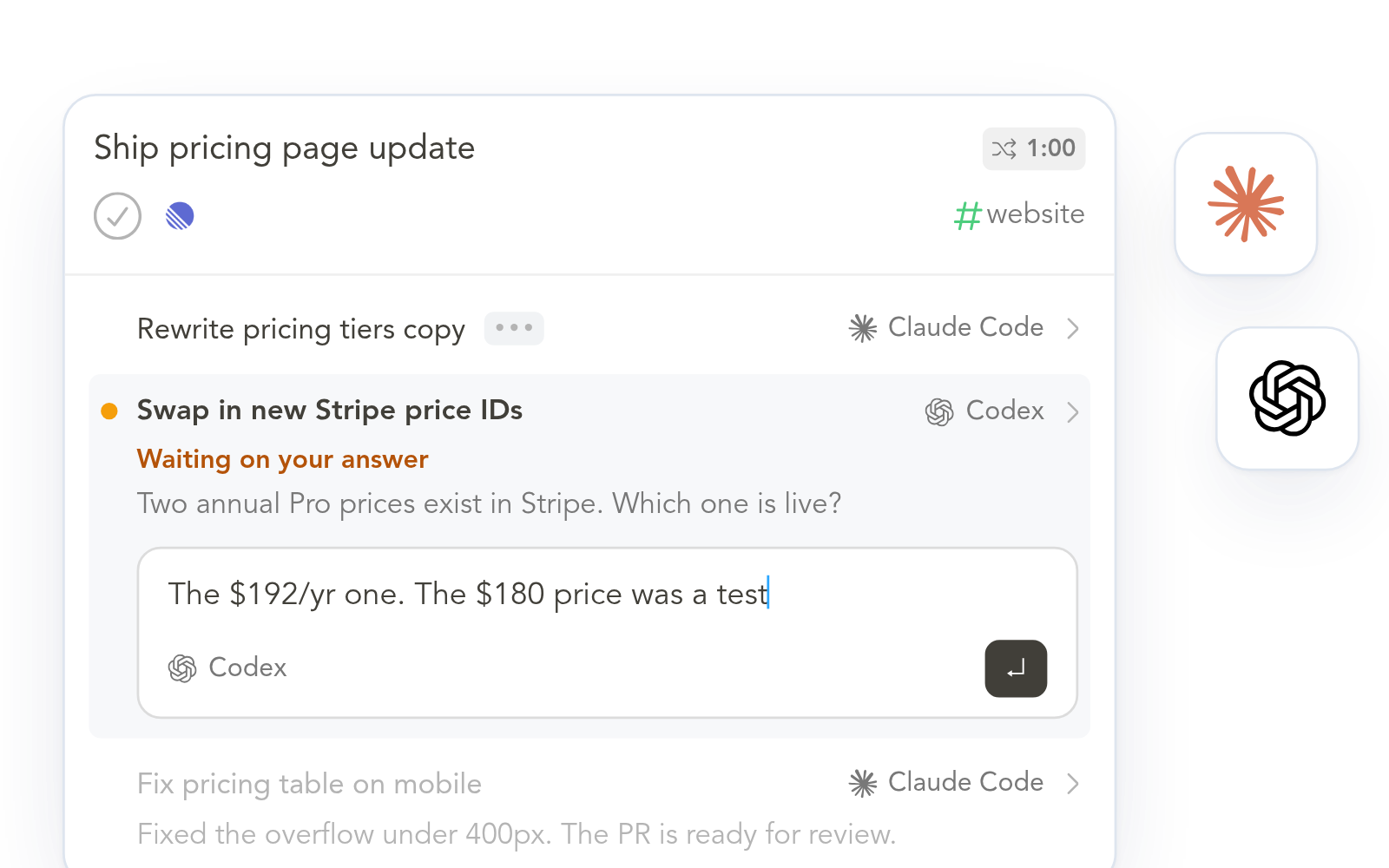
Sunsama's Agentic Delegation lets you organize all that work under a Sunsama task. It can pull together multiple threads of work in one place. You can read/respond to those threads from the app of your choice or do it directly from Sunsama for a more focused/sane experience.
This feature is currently in a limited beta.
Sunny + MCP
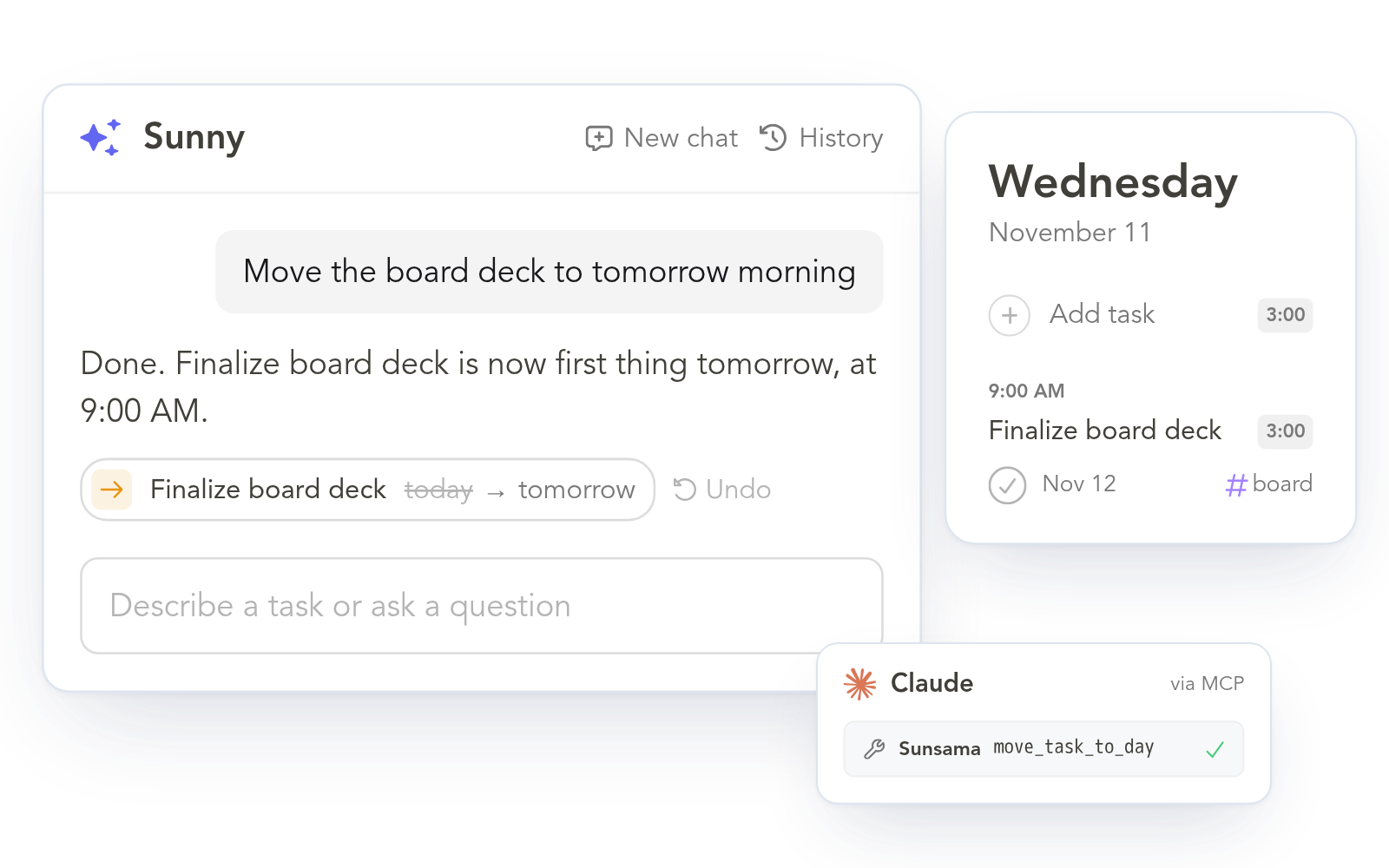
Sunny’s been massively upgraded. Sunny uses a smarter model now which means it should feel like it “just works” now. Sunny comes with new tools that let it do anything you can do in Sunsama yourself as well as the ability to perform sophisticated lookups and research on all your integrations.
Sunny is already live for everyone. But once you move to the new daily planning ritual, you’ll see a Sunny chat everyday where you’ll be able to adjust anything that the planner did. If you live in a different AI tool all day long, you can connect Sunsama via MCP to do all the same stuff there.
Catch-up
This is something we wanted to build for a very long time. Sunsama's Catch-up is a universal inbox of everything that happened since your last work day all in one place. Sunsama knows what kind of work matters to you, based on your tasks, objectives, and daily summaries and is able to automatically organize it for you from most relevant to least relevant. Quick keyboard shortcuts make it easy to triage your inbox and get things into your task list or closed up in your inbox. As part of this, we’ve also built rich and complete preview of your work in other tools directly inside Sunsama so you’ll be able to quickly edit a Trello task inside Sunsama or respond to an email!
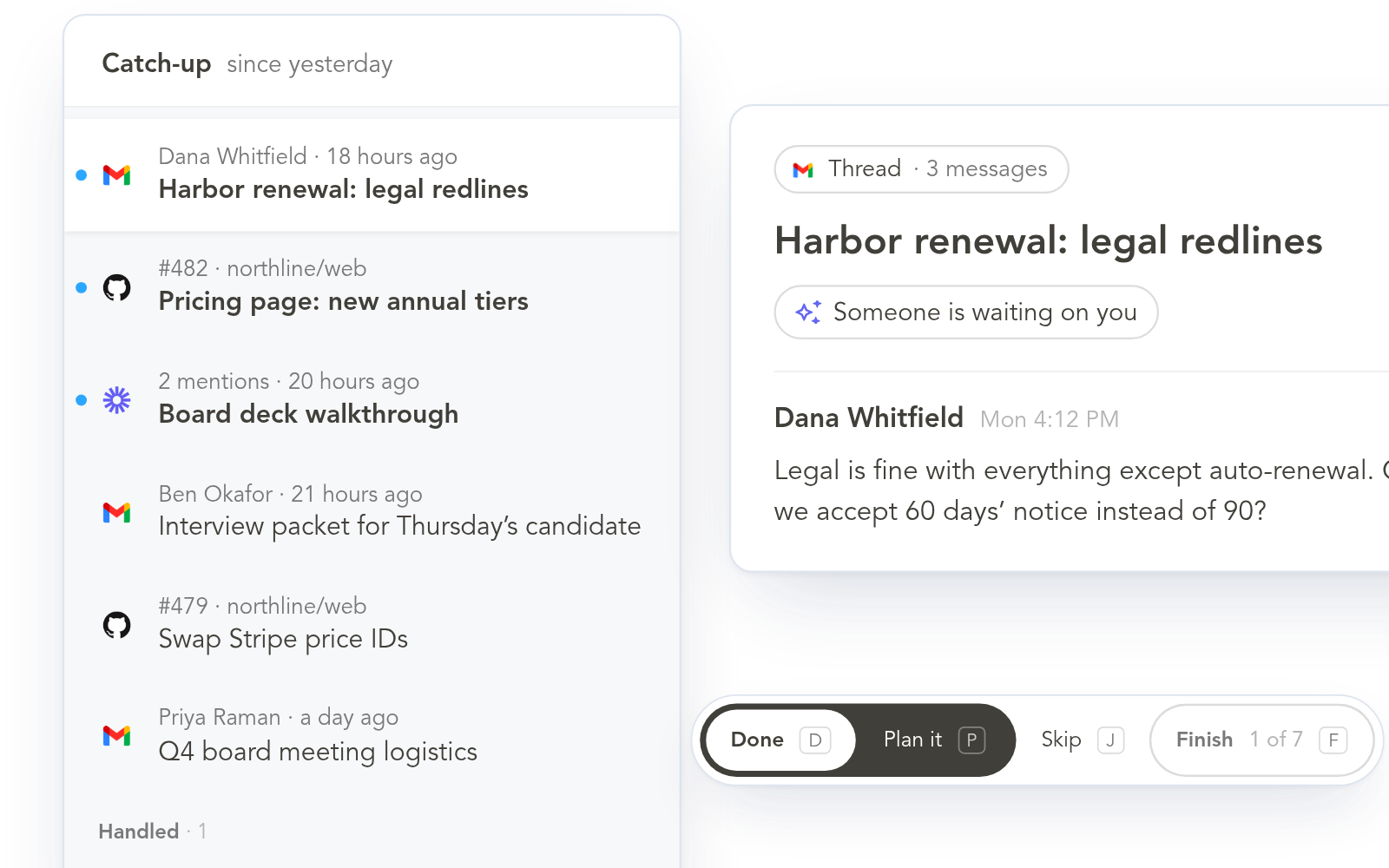
This feature is in internal alpha.
I’d love to hear from you. What has it felt like as AI has taken over knowledge work? How are you balancing it being easier than ever to do things but it being harder than ever to stay on top of it all?
— Ashutosh